Review-Z68 Chipset (ASUS P8Z68-V Pro): The Best Match for Your Sandy Bridge!

The first half of 2011 has been a busy period for Intel. After introducing the Sandy Bridge series of processors along with new desktop chipsets earlier this year, Intel has released yet another platform for their latest CPUs: the Z68. Essentially, Z68 is a culmination of the series 6 chipset that combines the most important aspects from its predecessors, the H67 and P67. But what exactly is it like? Let’s begin our discussion by exploring the unique features that distinguish the Z68 from the rest of the Sandy Bridge chipsets!

The Best of both Worlds: On-CPU graphics and Unlocked Multiplier
Prior to Z68’s arrival, Sandy Bridge overclockers were limited to the P67 chipset. However, while Sandy Bridge’s CPU cores function normally on a P67 mothebroard, its integrated graphics core will be rendered useless. The P67 provides no support for that. If you want to employ the Intel HD 2000 or HD 3000 embedded inside the Sandy Bridge, you’ll have to resort to the H67, which fully supports the graphics functionality yet severely lacking when it comes to overclocking. Users had to chose between the P67 (overclockability) or H67 (on-CPU graphics card). That’s no longer the case now. With the Z68, you can have both!
To test out Z68’s overclocking capability, we attempted to push a Core i7-2600K to its limit. Using air cooling, by the way, we don’t want to be too extreme here. Here are our results:
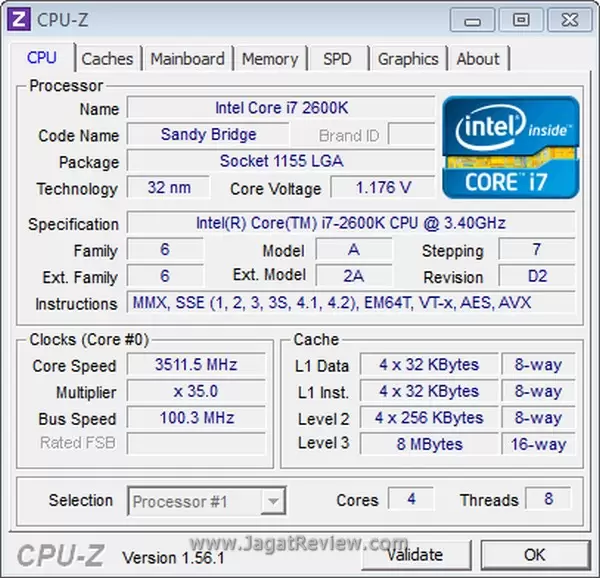

We managed to obtain a substantial increase in speed using the Z68. This is not surprising at all because the Core i7-2600K comes with an unlocked multiplier, but it does show that Z68 is similar with the P67 in terms if overclocking capability. We also overclocked the internal on-CPU graphics core, but we haven’t found a software that could properly display Sandy Bridge’s graphics hardware properties, so we couldn’t get the sceenshots just yet.
To show you how much additional performance can be gained from the overclocking, results from the overclocked system are also included in the benchmark charts.
VIRTU
One of the most annoying limitations of the P67 is its inability to utilize the on-CPU graphics core in any way. Once you installed a dedicated graphics card (which is unavoidable, because P67 motherboards lack support for the integrated graphics), Sandy Bridge’s on-CPU graphics core will be disabled automatically. This cuts off access to a number of handy features, such as Quicksync acceleration that could significantly speed up video encoding processes.
A third-party software provider, Lucid, came up with a solution to this problem: Virtu, a software that allows users to activate of Sandy Bridge’s on-CPU graphics even when a dedicated graphics card is being used. Now you can enable the on-board graphics anytime!
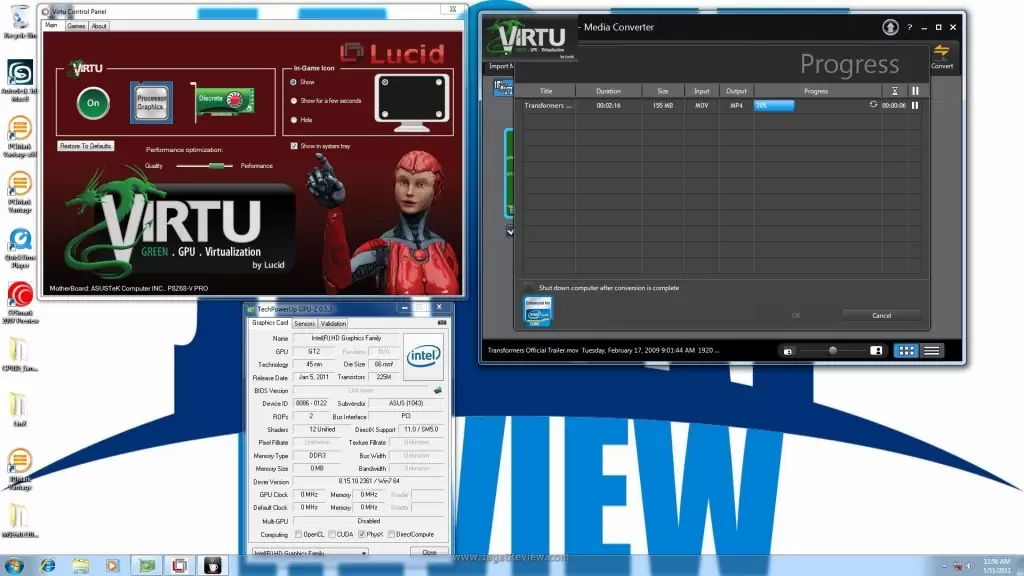
As shown in the above picture, when Virtu is enabled, the on-CPU graphics is detected. Note that the video transcoding application utilizes QuickSync acceleration.

When Virtu is turned off, the transcode application switches to CUDA acceleration provided by the dedicated graphics card.
More Articles