Review Printer Canon PIXMA MG7570

Dengan semakin canggihnya perkembangan printer multifungsi saat ini, tidaklah mengherankan jika kebanyakan produk printer multifungsi yang beredar saat ini akan menawarkan beragam jenis fitur termasuk Wireless. Tak hanya itu, printer yang dimaksimalkan untuk bisa melakukan cetak foto juga semakin marak beredar, baik untuk kebutuhan di rumah maupun untuk bisnis kecil menengah.
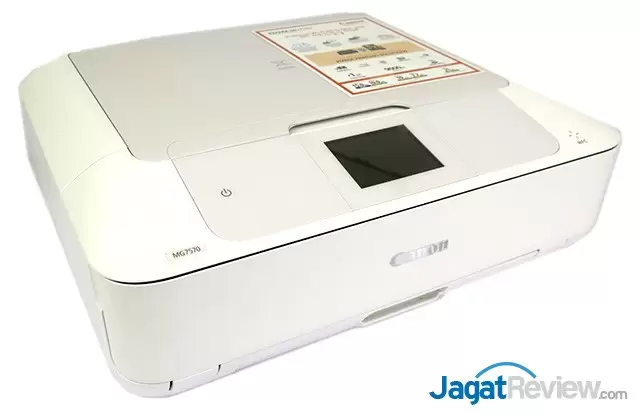
Printer Canon PIXMA MG7570 merupakan salah satu printer seri PIXMA yang didesain secara maksimal untuk mampu melakukan printing foto. Walau demikian, printer ini juga bisa digunakan untuk melakukan printing hitam putih serta fitur Copy dan Scan juga terdapat di dalamnya. Dengan dilengkapi dengan Wireless Ready, NFC, serta terdapat slot SD Card, maka printer Canon PIXMA MG7570 ini dapat digunakan bahkan tanpa harus terhubung dengan PC sekalipun.
Spesifikasi
| Maximum Printing Resolution | 9600 (horizontal) x 2400 (vertical)dpi | |
| Print Head / Ink | Number of Nozzles: | Total 6,656 nozzles |
| Ink Droplet Size (minimum): | 1pl | |
| Ink Tank: | PGI-750 (Pigment Black), CLI-751 (Cyan, Magenta, Yellow, Black, Gray) [Optional: PGI-750XL (Pigment Black) , CLI-751XL (Cyan, Magenta, Yellow, Black, Gray)] |
|
| Print Speed Based on ISO / IEC 24734. |
Document: Colour: ESAT / Simplex: |
Approx. 10.0ipm |
| Document: B/W: ESAT / Simplex: |
Approx. 15.0ipm | |
| Photo (4 x 6″): PP-201 / Borderless |
Approx. 21secs. | |
| Printable Width | Bordered: | Up to 203.2mm (8-inch) |
| Borderless: | Up to 216mm (8.5-inch) | |
| Printable Area | Borderless Printing: | Top / Bottom / Right / Left margin: each 0mm (supported paper size: A4 / Letter / 4 x 6″ / 5 x 7″ / 8 x 10″) |
| Bordered Printing: | Top margin: 3mm, Bottom margin: 5mm, Left / Right margin: each 3.4mm (Letter / Legal: Left: 6.4mm, Right: 6.3mm) |
|
| Bordered Auto 2-sided printing: | Top margin: 5mm, Bottom margin: 5mm, Left / Right margin: 3.4mm (Letter / Legal: Left: 6.4mm, Right: 6.3mm) |
|
| Recommended Printing Area | Top Margin: | 40.7mm |
| Bottom Margin: | 37.4 mm | |
| Paper Size | A4, A5, B5, Letter, Legal, 4 x 6″, 5 x 7″, 8 x 10″, Envelopes (DL, COM10), Custom Size [cassette (upper): width 89 – 200mm, length 127 – 184.99mm, cassette (lower): width 90 – 215.9mm, length 185 – 355.6mm] |
|
| Paper Handling [Cassette, (Upper)] (Maximum Number) |
Photo Paper Pro Platinum (PT-101) | 4 x 6″ = 20 |
| Photo Paper Plus Glossy II (PP-201) |
4 x 6″ = 20 | |
| Photo Paper Plus Semi-Gloss (SG-201) | 4 x 6″ = 20 | |
| Glossy Photo Paper “Everyday Use” (GP-601) | 4 x 6″ = 20 | |
| Matte Photo Paper (MP-101) | 4 x 6″ = 20 | |
| Photo Stickers (PS-101) | 1 | |
| Paper Handling [Cassette (Lower)] (Maximum Number) |
Plain Paper | A4, A5, B5, Letter, Legal = 125 |
| High Resolution Paper (HR-101N) | A4 = 65 | |
| Photo Paper Pro Platinum (PT-101) | A4 =10 | |
| Photo Paper Plus Glossy II (PP-201) | A4 =10 | |
| Photo Paper Pro Luster (LU-101) | A4 =10 | |
| Photo Paper Plus Semi-Gloss (SG-201) | A4, 8 x 10″ = 10 | |
| Photo Paper “Everyday Use” (GP-601) | A4 =10 | |
| Matte Photo Paper (MP-101) | A4 =10 | |
| Envelope | European DL / US Com. #10 = 10 | |
| Other Fine Art Paper | A4, LTR = 1 | |
| Disc Handling (Disc tray) | 1 (Manual handling by disc tray) | |
| Support Media for Auto 2-sided printing | Type: | Plain Paper |
| Size: | A4, A5, B5, Letter | |
| Paper Weight | Cassette (upper): | Canon specialty paper: max paper weight: approx. 300g/m2 (Photo Paper Pro Platinum PT-101) |
| Cassette (lower): | Plain Paper: 64 – 105g/m2, Canon specialty paper: max paper weight: approx. 300g/m2 (Photo Paper Pro Platinum PT-101) |
|
| Ink End Sensor | Optical sensor + Dot Count | |
| Print Head Alignment | Auto / Manual | |
| Scan | ||
| Scanner Type | Flatbed | |
| Scanning Method | CIS (Contact Image Sensor) | |
| Optical Resolution | 2400 x 4800dpi | |
| Selectable Resolution | 25 – 19200dpi | |
| Scanning Bit Depth (Input / Output) | Grayscale: | 16 bits / 8 bits |
| Colour: | 48 bits / 24 bits (RGB each 16 bits / 8 bits ) | |
| Line Scanning Speed | Grayscale: | 1.2ms/line (300dpi) |
| Colour: | 3.5ms/line (300dpi) | |
| Scanning Speed | Reflective: A4 Colour / 300dpi |
14secs. |
| Maximum Document Size | Flatbed: | A4 / LTR (216 x 297mm) |
| Copy | ||
| Maximum Document Size | A4 / LTR (216 x 297mm) | |
| Compatible Media | Size: | A4, A5, B5, LTR, 4 x 6″, 5 x 7″ |
| Type: | Plain Paper Photo Paper Pro Platinum (PT-101) Photo Paper Plus Glossy II (PP-201) Photo Paper Pro Luster (LU-101) Photo Paper Plus Semi-Gloss (SG-201) Glossy Photo Paper “Everyday Use” (GP-601) Matte Photo Paper (MP-101) Printable disc |
|
| Image Quality | 3 positions (Fast, Standard, High) | |
| Density Adjustment | 9 positions, Auto intensity (AE copy) | |
| Copy Speed Based on ISO / IEC 29183. |
Document: Colour: sFCOT / Simplex: |
19secs. |
| Document: Colour: sESAT / Simplex: |
7.7ipm | |
| Multiple Copy | Black / Colour: | 99 pages |
| Network | ||
| Protocol | TCP/IP | |
| Wired LAN | Network Type: | IEEE802.3u (100BASE-TX) / IEEE802.3 (10BASE-T) |
| Data Rate: | 10M / 100Mbps (auto switchable) | |
| Wireless LAN | Network Type: | IEEE802.11n / IEEE802.11g / IEEE802.11b (infrastructure mode) |
| Frequency Band: | 2.4GHz | |
| Range: | Indoor 50m (depends on the transmission speed and conditions) | |
| Security: | WEP64 / 128bit, WPA-PSK (TKIP / AES), WPA2-PSK (TKIP / AES) | |
| System Requirements | Windows: | Windows 8 / Windows 7 / Window Vista ) / Windows XP |
| Macintosh: | Mac OS X v10.6.8 or later | |
| General | ||
| Operation Panel | Display: | LCD (3.5inch / 8.8cm TFT colour/ Touch) |
| Interface | USB 2.0 Hi-Speed, Card Slots, Ethernet | |
| NFC | Available | |
| Apple AirPrint | Available | |
| Google Cloud Print | Available | |
| PictBridge | Wireless LAN: | Available |
| LAN: | Available | |
| PIXMA Cloud Link | From smartphone or tablet: | Available |
| From printer: | Available | |
| PIXMA Printing Solutions | Available | |
| Access Point Mode | Available | |
| Self-Opening Paper Output Tray | Available | |
| Operating Environment | Temperature: | 5 – 35°C |
| Humidity: | 10 – 90% RH (no dew condensation) |
|
| Recommended Environment | Temperature: | 15 – 30°C |
| Humidity: | 10 – 80% RH (no dew condensation) |
|
| Storage Environment | Temperature: | 0 – 40°C |
| Humidity: | 5 – 95% RH (no dew condensation) |
|
| Acoustic Noise (PC Print) | Photo (4 x 6″) | Approx. 44.0dB(A) |
| Document (A4, B/W) Quiet Mode OFF: |
Approx. 52.1dB(A) | |
| Document (A4, B/W) Quiet Mode ON: |
Approx. 39.8dB(A) | |
| Power | AC 100 – 240V, 50 / 60Hz | |
| Power Consumption | Standby (scanning lamp is off) (USB connection to PC): |
Approx. 1.0W |
| OFF: | Approx. 0.2W | |
| Copying: (USB connection to PC) |
Approx. 17W | |
| Environment | Regulation: | RoHS (EU, China), WEEE (EU) |
| Eco-Label: | Energy Star, EPEAT | |
| Dimension (W x D x H) | Approx. 435 x 370 x 148mm | |
| Weight | Approx. 7.9kg | |
- Intro, Spesifikasi
- Printer Canon PIXMA MG7570 dan Kelengkapan
- Hasil Pengujian
- Kesimpulan, Data Teknis
More Articles